
✅ Today’s Checklist:
- Outlook shortcuts that save you 30 minutes a day
- How to speak up in cross-team meetings
- Advice on how to move up in your career
🤔 Riddle me this: I cost nothing to give but can change someone’s entire day. I’m most powerful when unexpected. What am I? (Find the answer on the bottom).
QUICK LINKS
📣 Only 31% of entry-level women have a sponsor at work, even as ambition spikes.
💆🏻 Turns out most of us have been using hair masks wrong.
🧘 Four things to come back to when your brain won’t slow down.
📊 New data on women, pay, and AI in the workplace, and yes, the pay gap is still showing up.
INBOX EFFICIENCY

The Outlook Shortcuts That Earn You Back 30 Minutes A Day
If you’re spending your workday clicking through menus in Outlook, you’re leaving time on the table. Keyboard shortcuts exist for nearly every action you take in your inbox. Once they become muscle memory, the time savings add up fast. We’re talking an estimated 30 minutes a day for heavy Outlook users.
Here’s a breakdown of the shortcuts worth learning first.
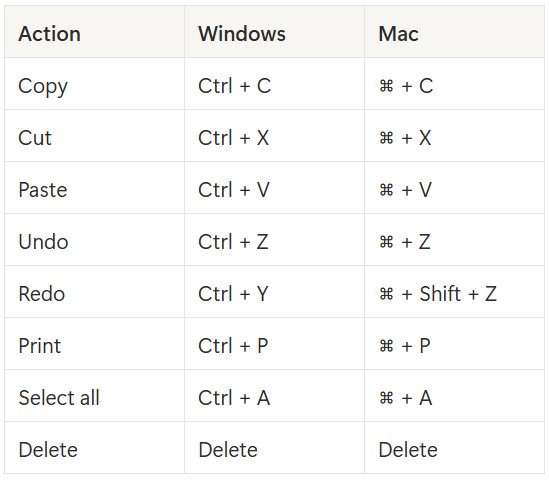
Start with the basics
These apply in Outlook just like anywhere else. If you’re on a Mac, swap Ctrl for ⌘.
The email shortcuts you’ll use every single day
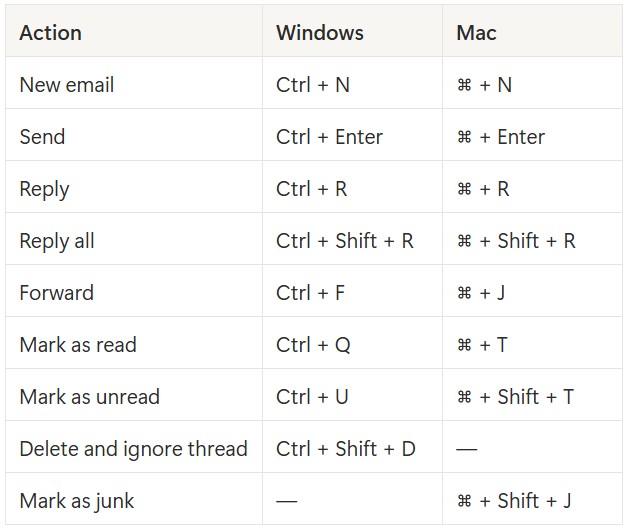
These are the ones that make the biggest difference in a typical workday. Note that the Forward shortcut is different on Mac than you might expect.
Navigate your inbox without touching your mouse
If you live between your inbox and calendar all day, these four shortcuts alone will feel like a revelation.
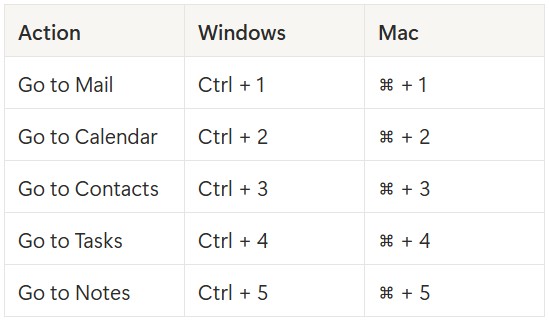
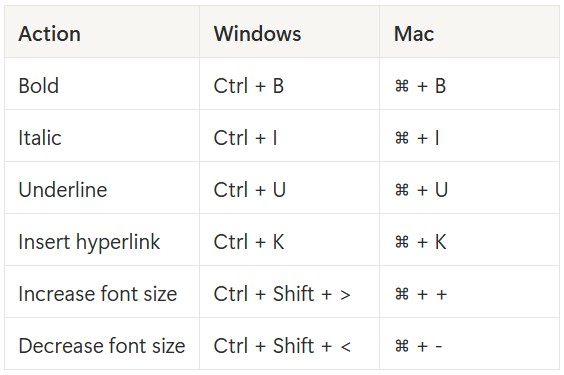
Don’t sleep on formatting shortcuts
Most people are still reaching for the toolbar when they don’t need to.
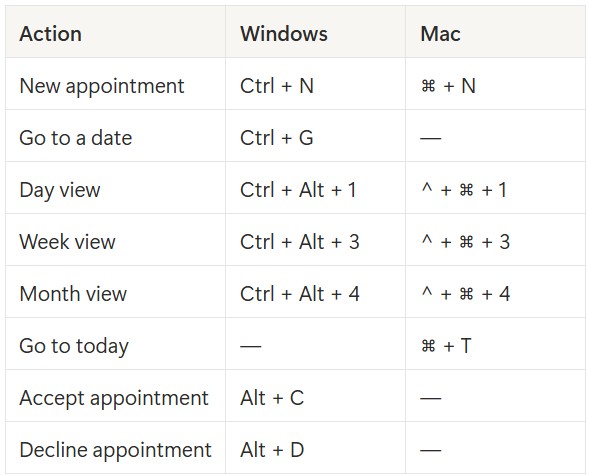
Calendar shortcuts worth knowing
One feature that goes beyond shortcuts: Quick Steps
If you find yourself doing the same multi-step actions repeatedly (like marking something read and filing it to a folder), Outlook’s Quick Steps feature lets you bundle those into a single click or custom keyboard shortcut. You can set one up by going to Home, finding the Quick Steps menu, and selecting “Create New Quick Step.” Outlook comes with a few pre-built options (like forwarding to your manager or marking done and archiving), but you can fully customize them to match how you actually work.
How to find every shortcut in Outlook
You don’t have to memorize this list all at once. Inside Outlook, go to Settings, then General, then Accessibility. From there, press “?” to pull up the full list of supported keyboard shortcuts anytime you need a refresh.
GRAD GIFT
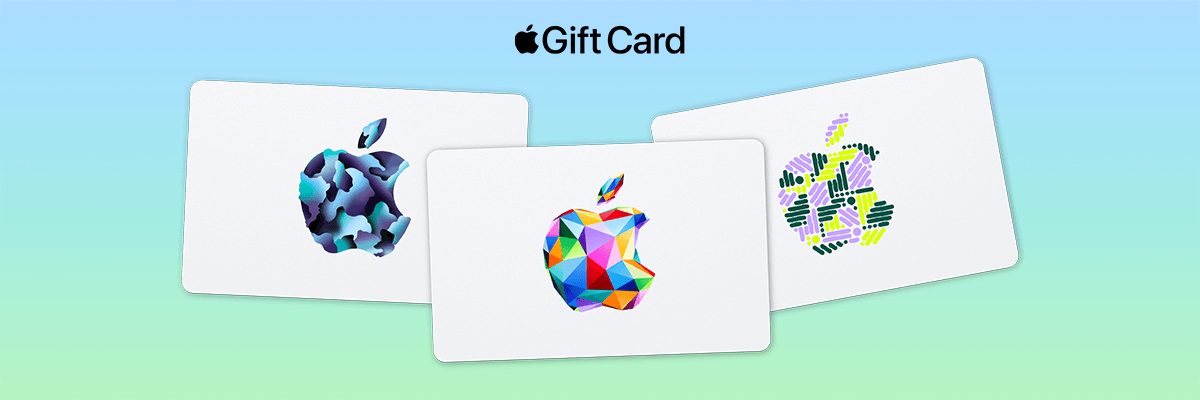
A Graduation Gift Should Still Be Worth Something in September
Some gifts celebrate the moment. The best ones are still pulling their weight even months later.
When a grad is setting up their first apartment, starting a new job, or figuring out a routine that looks nothing like the one they had last year, they don’t need another decorative item. They need options.
Apple Gift Card covers the practical and the fun: iCloud storage when their iPhone fills up, Apple Music for the commute that’s about to become their life, apps that help them stay organized, Apple TV for the nights they finally get to sit down, Apple Arcade for the breaks in between. Products and accessories, too, plus third-party subscriptions.
Available from $15 to $200 in physical and digital formats.
BIGGEST CHALLENGE

How To Find Your Voice In Cross-Team Meetings
“My biggest problem is speaking up in meetings with people outside my team.” — Brittany A.
If you have ever sat in a cross-functional meeting with a great idea and said absolutely nothing, this is for you. Something about being in a room with people you do not know well has a way of making even the most capable people go quiet.
But here’s what that silence is actually costing you, and more importantly, how to fix it.
Start by figuring out the real root cause
Not all meeting anxiety looks the same, and the fix depends entirely on what is actually driving it. So before anything else, get honest with yourself.
Did something happen with someone on another team that made you pull back? Do you feel like your ideas are not important enough to share? Are you newer to the company and just do not know these people yet? Are you simply more introverted and need more familiarity before you feel comfortable opening up?
The answer matters because a bad experience with a colleague requires a different response than general shyness, which requires a different response than imposter syndrome. Identify the root cause first and then tackle it directly.
Reframe what the meeting actually is
A lot of meeting anxiety comes from treating a meeting like a performance. You are not on stage. Nobody is waiting to judge your delivery or score your contribution on a scale of one to ten.
A meeting is a collaboration. You are there to think out loud with other people, share what you know, and figure things out together. That reframe sounds small but it changes everything. The pressure drops when you stop thinking of yourself as a performer and start thinking of yourself as a contributor.
Remember why you were hired
This one is important. You were hired because someone looked at your skills, your experience, and your perspective and decided the team needed exactly that. When you stay silent in a meeting, you are not just holding yourself back. You are withholding something the room actually needs.
Staying quiet means the people making decisions don’t have your input. That’s a loss for everyone, especially you.
Every meeting is practice for the next one
Every cross-functional meeting is an opportunity to build a skill that will serve you for the rest of your career. Public communication, cross-team influence, executive presence — none of it develops in silence.
Start small. Ask one question. Affirm someone else’s point and add to it. Share one observation. You do not have to deliver a monologue. You just have to show up in the conversation. Each time you do, it gets a little easier and a little more natural.
Build the relationship before the meeting
If unfamiliarity is what is holding you back, close the gap outside the meeting room. A quick intro message, a casual coffee chat, or even a friendly Slack exchange with someone from another team can make the next meeting feel significantly less intimidating.
Familiarity breeds comfort. Comfort breeds confidence.
You already have something worth saying. The room is waiting to hear it.
FOUNDER TAKE
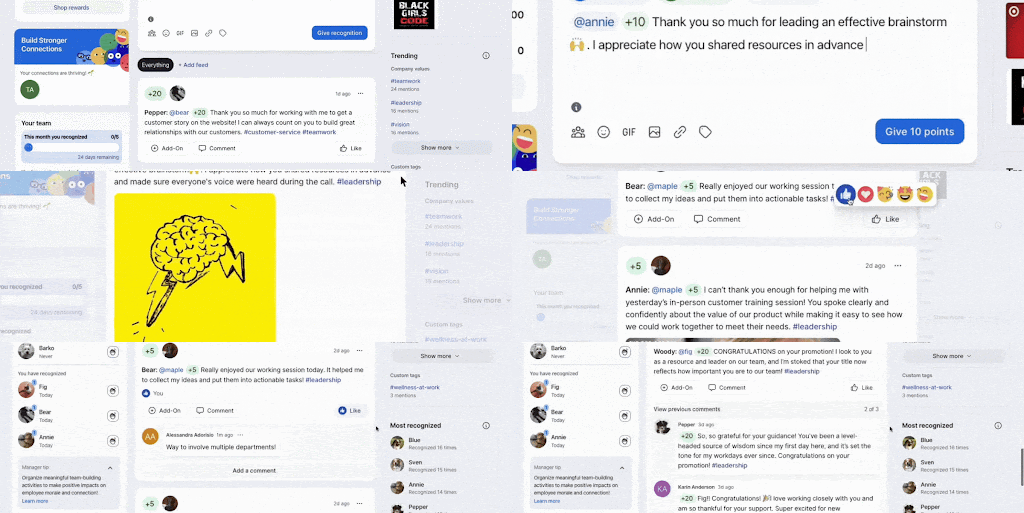
I Watched Bonusly Change How 1,000+ People Worked
At my last company, over a thousand people used Bonusly. I watched it go from a new-ish HR rollout to the thing everyone obsessed over.
The public recognition feed became something people checked on their own. Managers were giving shoutouts without being asked. And because the rewards were real (I personally redeemed mine for a flight to Cabo 🙌), the whole thing had actual stakes.
Here’s the part I didn’t appreciate until now: as a founder, I know how hard it is to get your whole team to actually adopt something new. People ignore tools. They forget. They revert. Bonusly didn’t have that problem. Nobody had to chase anyone. It just ran.
My team went back and reviewed it properly so I could share it with you. (Spoiler: still a yes.)
👉 Here’s the full Bonusly breakdown.
And if you’re already using it, hit reply. Always curious what the TA community is actually experiencing out there.

Joanna (TA Co-Founder)
STAFF PICKS
Stuff We’re Loving This Week
☕ Free event: On 6/4 hear Scott Galloway + learn how to turn data, processes, & people into AI powerhouses.
🥛 Coffee shop foam is easier than you think when an automatic milk frother lives on your counter.
🪞 A simple mirror upgrade that makes your bathroom feel like a hotel.
☁️ A duvet insert that makes your bed feel cozy but not too heavy.
JUST FOR FUN
COMMUNITY
 Upcoming Events
- TODAY May 5 @ 9AM PT: Speed Meet (SGS Only* | Join the waitlist)
- Thurs May 7 @ 9AM PT: Communication Workshop: Developing Conflict Intelligence (SGS Only* | Join the waitlist)
- Fri May 8 @ 9AM PT: Where to Invest First (401k, Roth IRA, or Brokerage?)
- Tues-Wed May 12-13 @ 6-9AM PT: How Screens Hijack Your Kid’s Brain and What to Do About It
* Smart Girl Society is our private community for women who want deeper conversations, accountability, and tools that actually make life easier. Join the waitlist to get in the next round.
 Work Wisdom of the Week:
“Want to move up? First, show what you can do. Results matter. Once you’ve built a solid track record, speak up for yourself; no one can do it better than you. Keep data handy to back your claims. Without proof, advocacy is just talk.”

Sarah Zerrusen, Talent Acquisition and Development Manager


SPILL THE TEA
Take Our Poll
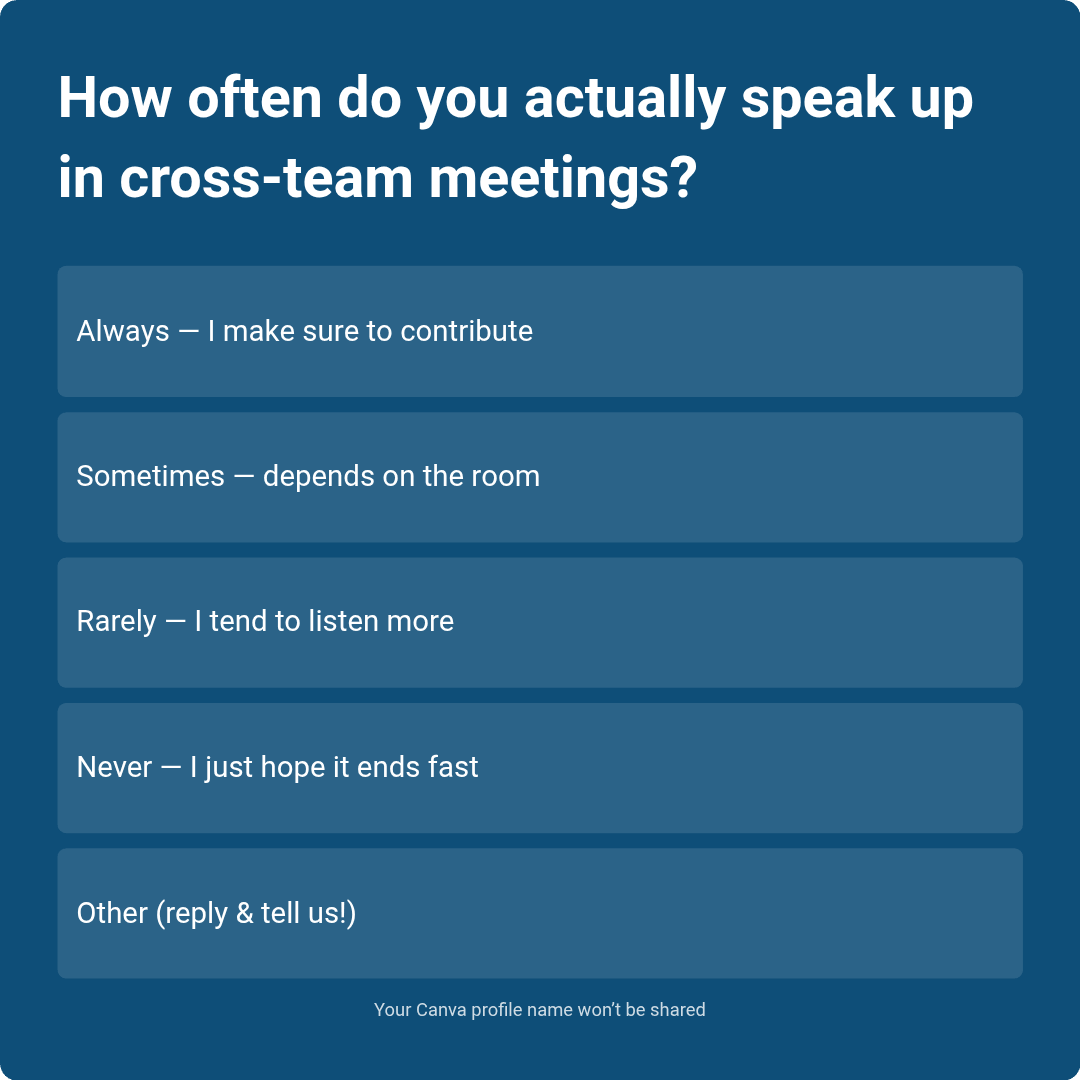
Have more feedback? 💌 Reply to this email and tell us.
✨ P.S. Want more inspiration and positivity to kick off your week? Sign up for our Motivational Monday texts (U.S. only).
👀 Want to see if your company is a good fit for our 250k+ ambitious readers? Join our Sponsor Waitlist here.